Conceptos fundamentales de las conexiones VGA y HDMI
Matriz de gráficos de video (VGA): Es una interfaz aplicada y de entrada/salida asociada a la década de 1980, que solo transportaba señales digitales (RGB) y no transfería vídeo y audio de alta definición. Interfaz multimedia de alta definición (abreviada como HDMIEs una interfaz multimedia del siglo XXI; puede transmitir video digital con las señales de audio correspondientes. Dado que la VGA es una señal analógica y la HDMI es una señal digital, la conversión de una a otra requiere tanto cambiar físicamente las interfaces como realizar una conversión de analógico a digital (ADC). Esto significa que los cables por sí solos no podrán realizar la tarea, por lo que se necesita un convertidor o un adaptador para cambiar el formato de la señal.
Capítulo 1: Conceptos básicos sobre la conversión de VGA a HDMI
Comparación técnica entre VGA y HDMI
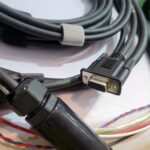
La transferencia de la matriz gráfica visual (VGA) se realiza mediante un conector D-sub de 15 pines, que transfiere señales analógicas de rojo, verde y azul (RGB) susceptibles de degradarse con la distancia y el ruido. Por otro lado, HDMI tiene un conector de 19 pines y admite vídeo digital sin comprimir con hasta 8 canales de audio. Esta diferencia fundamental requiere una funcionalidad electrónica adicional para convertir VGA a HDMI.
Cómo funciona la conversión de VGA a HDMI
Por lo tanto, el funcionamiento interno de VGA a HDMI El convertidor transforma la otra forma en señales digitales. Comienza recibiendo señales RGB analógicas del ordenador a través de la salida VGA, que luego se convierten en digitales mediante un ADC, seguido de una salida HDMI.
Los convertidores de mayor calidad (por ejemplo, ATEN VC180), que incluso incluyen circuitos de sincronización de reloj, podrán admitir resoluciones de 1080p e imágenes de alta claridad sin parpadeos.
Problemas comunes durante la conversión
Convierta el proceso en una conversión de analógico a digital. Las fallas comunes incluyen:
“Sin imagen” (normalmente debido a una incompatibilidad de resolución; es posible que los dispositivos VGA no admitan resoluciones demasiado altas; ajuste la salida de la computadora a 1024×768 o 640×480).
“Bordes negros en la parte superior/inferior de la pantalla” (dependiendo de la relación de aspecto)
“Parpadeo de la pantalla con una alta frecuencia de actualización” (es necesario ajustar la frecuencia de actualización).
Capítulo 2: Preguntas sobre la transmisión de audio
Combinación de señales VGA y de audio
Por lo tanto, VGA es una interfaz de video y no transmite audio. Esto significa que cuando una señal VGA se convierte a HDMI a través de un adaptador estándar, nunca se transmitirá ningún canal de audio a través de la interfaz HDMI.
Capacidades de transmisión de audio de HDMI
En cuanto a la interfaz física HDMI en sí, es compatible con audio digital multicanal. Sin embargo, en este caso la fuente es VGA, por lo que el audio también debe convertirse.
Soluciones y recomendaciones
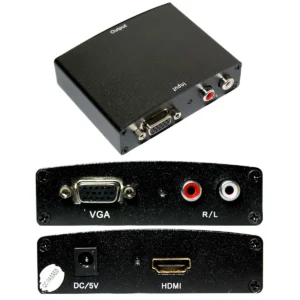
La mayoría de los convertidores VGA a HDMI del mercado vienen con un puerto de entrada de audio independiente (conector de audio de 3,5 mm). Para utilizarlo, conecte un cable de audio al conector para audífonos de su computadora o dispositivo (o cualquier otra fuente que esté utilizando para emitir sonido) y conecte ese extremo al convertidor. Esto permite que el convertidor transmita, por así decirlo, la señal de audio al HDMI.
Capítulo 3: Elegir el adaptador VGA a HDMI adecuado
Tipos y funciones de los convertidores
En cuanto al tipo adecuado de convertidor de VGA a HDMI, por regla general son convertidores unidireccionales (VGA a HDMI) o bidireccionales (HDMI a VGA). Un convertidor “VGA a HDMI” (como el que se muestra aquí) es lo que necesita si desea conectar un ordenador con salida “analógica (VGA)”, como un ordenador de escritorio antiguo o un portátil antiguo, a una pantalla HDMI.
¿Cómo seleccionar el convertidor adecuado?
Tenga en cuenta los siguientes factores:
Compatibilidad con la resolución: asegúrese de que el convertidor sea compatible con una resolución de salida de 1080p o superior.
Alimentación: La conexión de salida VGA por sí sola no puede generar alimentación, por lo que algunos convertidores de VGA a HDMI incluyen su propia fuente de alimentación externa independiente, normalmente a través de USB.
Compatibilidad: asegúrate de que el convertidor sea compatible con tu sistema operativo (Windows, macOS).
Capítulo 4: Cómo funcionan los cables de conversión de VGA a HDMI
Construcción y características del cable
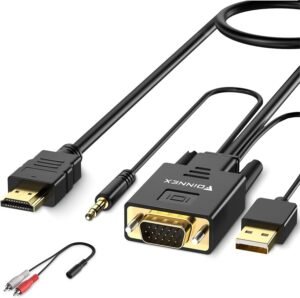
La conversión de señal no puede ocurrir en cables puros, ya que se trata de una conexión puramente física. Los cables HDMI, comúnmente llamados “cables VGA a HDMI”, que se comercializan y venden como tales, suelen tener un chip de conversión miniaturizado integrado en el hardware.
Consideraciones sobre la selección y el uso de cables
Selección de la longitud del cable: Opte por cables de entre 1 y 3 metros, ya que así se garantiza una degradación mínima de la señal.
Blindaje: los cables de calidad están bien blindados contra las interferencias electromagnéticas, lo que evita problemas de señal.
Especificaciones del conector: Compruebe que un extremo del cable tiene un conector VGA de 15 pines y el otro extremo tiene un conector HDMI de 19 pines.
Problemas comunes y soluciones
Daño en el cable: un cable demasiado largo o doblado puede provocar fallos en el contacto interno del chip.
Resoluciones: los chips integrados pueden limitar la resolución máxima alcanzable; céntrese en los convertidores externos para obtener un rendimiento superior.
Capítulo 5: Adaptador VGA a HDMI
¿Qué es un adaptador? ¿Para qué sirve?
Por lo general, se refiere a una caja de conversión HDMI/VGA como adaptador, que tendrá un extremo conectado a una fuente de señal VGA, mientras que el otro emite una señal HDMI. También tiene una interfaz de alimentación.
Diferencia entre adaptadores y convertidores
Los adaptadores (cajas de conversión) contienen chips ADC completos y placas de circuito en su interior, que son más estables y pueden soportar una mayor resolución; por otro lado, los convertidores (cables) son simplemente cables con un diseño de chip integrado que tienen un tamaño más pequeño pero un rendimiento limitado.
Adaptadores recomendados para situaciones específicas
Presentaciones empresariales: utilice adaptadores independientes ATEN o U-Tech para obtener estabilidad de señal.
Entretenimiento en el hogar: para los usuarios que solo se conectan al televisor, los adaptadores iniciales de U-Tech cumplen con los requisitos de manera satisfactoria.
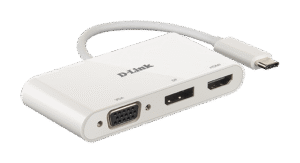
Capítulo 6: Adaptador de conector HDMI a enchufe VGA
Escenarios de aplicación y análisis de requisitos
Este adaptador es muy útil cuando se desea conectar señales digitales modernas (por ejemplo, consolas de videojuegos o reproductores de Blu-ray) con proyectores antiguos.
Métodos de conexión y precauciones
Sin embargo, esta conversión a señales VGA analógicas (ya que HDMI es digital) tiene un costo más elevado, ya que requiere chips de decodificación más complejos. La conversión puede provocar una pérdida de calidad.
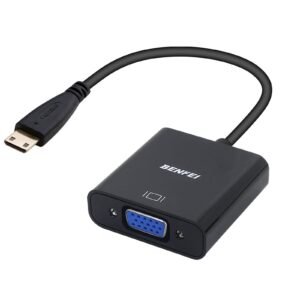
Capítulo 7: Adaptador mini HDMI a VGA
¿Qué es el Mini HDMI, cuáles son sus características y aplicaciones?
Las tabletas, las cámaras digitales y algunas consolas de videojuegos utilizan conectores Mini HDMI o Micro HDMI. A pesar de tener unas dimensiones de interfaz más pequeñas, sus principios de transmisión son los mismos que los del HDMI estándar.
Requisitos técnicos durante la conversión
La segunda cuestión es la intensidad de la señal analógica, ya que cuando se dispone de una fuente de alimentación externa más potente en la caja de conversión, esto favorece el funcionamiento de estas señales analógicas.
Dispositivos compatibles y aplicaciones comerciales
Cámaras digitales/tabletas: conéctelas a un proyector mientras realiza presentaciones.
Consolas de videojuegos: PS4 o Nintendo Switch que requieren conectarse a proyectores más antiguos.
Conclusión
Esto es sin duda beneficioso en nuestro mundo digital y en la conclusión de los convertidores de VGA a HDMI.
Hoy en día, hay muchos dispositivos electrónicos que pueden incorporar cualquiera de los dos puertos.
Por lo tanto, estos convertidores entran en juego para ayudarle a transferir la señal sin complicaciones ni problemas de conexión.
Y no solo eso, sino que los convertidores de VGA a HDMI por fin están empezando a estar mucho más disponibles.
Algunas recomendaciones útiles que conviene recordar son: Ajustar siempre la resolución de imagen del televisor al nivel óptimo.
Permitirá que su convertidor funcione correctamente.
Si tienes algún problema, ponte en contacto con los profesionales y expertos adecuados.
Aunque existen varios proveedores de convertidores, es conveniente conocer las principales características de su convertidor.
Si es así, esperamos que esta guía le haya ayudado a comprender mejor el panorama digital.
Si estás buscando alguna forma de reproducir archivos multimedia en casa o soluciones rápidas de conversión en el departamento de TI de tu trabajo, este artículo te proporcionará las mejores soluciones y opciones de conversión.
Póngase en contacto con Jinhai Hoy mismo para obtener los cables VGA a HDMI personalizados para su proyecto.